Architecture
Make sure to read the Getting Started and Terminology first.
Main Concepts
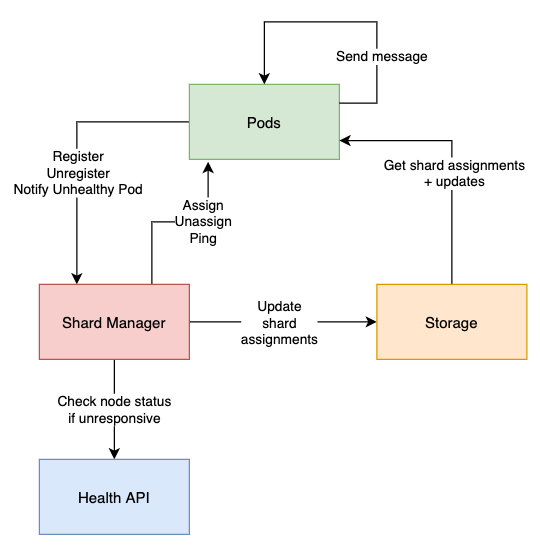
- The Shard Manager is a single node in charge of maintaining the pods <-> shards assignments. Only one Shard Manager should be alive at any given time.
- Pods register to the Shard Manager when they start and unregister when they stop.
- Pods read the shard assignments from the Storage layer (including updates) and cache them locally. When the Shard Manager assigns or unassigns shards to/from pods, it notifies them directly.
- When a pod sends a message to a given entity, it checks which shard this entity belongs to and redirects the message to the pod in charge of that shard. That pod will then start the entity behavior locally if it was not already started.
- The Shard ID assigned to an entity is calculated as follows:
shardId = abs(entityId.hashCode % numberOfShards) + 1. In other words, it is a stable number between 1 and the number of shards. - When a pod is unresponsive, other pods will notify the Shard Manager, who will check with the Health API if the pod is still alive. It will then unassign shards from this pod only if the pod is not alive (as long as it’s alive, we can’t reassign its shards because it might cause an entity to be alive in 2 different pods).
No single point of failure
The Shard Manager is actually involved only when pods are added or removed.
The rest of the time, it does nothing since pods have a cached version of shard assignments and communicate between themselves directly. That means they are able to work even if the Shard Manager is down.
Pod Roles
Each pod has a role (defaults to default). The Shard Manager manages each role independently: every role has its own set of shards, its own rebalancing, and its own assignment state. Messages can only be sent to entities that live on pods with the same role as the sender. This lets you dedicate certain pods to certain entity types or scale parts of your system independently. See Configuration for how to configure roles.
Detailed flows
Pod Start (Sharding#register)
- Pod gets shard assignments from the Storage layer.
- Pod exposes the sharding API (e.g. starts a gRPC server) so that it can be contacted by the Shard Manager and other pods.
- Pod calls the
registerendpoint of the Shard Manager. This will eventually trigger a rebalance, and some shards may be assigned to this pod. When that happens, the Shard Manager will call theassignAPI of this pod.
Pod Stop (Sharding#unregister)
- Pod prevents any new entity to be started locally. Any message received from other pods will return the
EntityNotManagedByThisPoderror and be retried. - Pod stops all local entities. Messages already received are processed (up to
entityTerminationTimeout). - Once all entities are stopped, pod calls the
unregisterendpoint of the Shard Manager. This will trigger an instant rebalance, so that shards handled by this pod will be assigned to other pods. - Pod stops the sharding API and is ready to stop.
Sending a message to an entity (Messenger#send)
- Pod1 needs to send a message to a given entity.
- Pod1 calculates the shard ID for that entity.
- Pod1 checks in local shard assignments cache which pod is responsible for this entity. It is Pod2. If Pod1 == Pod2, the next step is skipped.
- Pod1 calls the
sendMessageendpoint of Pod2's sharding API. - Pod2 redirects the message to its
EntityManager - Pod2
EntityManagercalculates the shard ID for that entity and checks that this shards ID should be handled locally. If not, it returns theEntityNotManagedByThisPoderror. - Pod2 starts the entity if it was not already started and forward the message to it.
- When a response is produced, the response is sent back to Pod1.
Unresponsive Pod
If Pod2 is not responsive, Pod1 will call the notifyUnhealthyPod endpoint of the Shard Manager. The Shard Manager will check with the Health API (e.g. Kubernetes) if the pod is still alive and unregister it if not. Pod1 will keep retrying and hopefully a new pod will be assigned very soon.
Rebalance Algorithm
The rebalance process is the action of assigning or unassigning shards from/to pods. It is triggered:
- when the first pod registers (it will be assigned all shards)
- when a pod unregisters
- on a regular interval defined by
rebalanceInterval(see Config)
The workflow is designed so that a shard can never be assigned to 2 different pods at the same time.
- Shard Manager decides which shards should be assigned and unassigned (see Assignment Algorithm).
- Shard Manager pings all pods involved in assignments and unassignments to check that they are responsive (default timeout = 3s, defined by
pingTimeout(see Config)). This step is to avoid dealing with dead nodes, which would slow down the rebalance process. Unresponsive pods are removed from assignments and unassignments. Pings are done in parallel. - Shard Manager calls the
unassignendpoint of all pods that have shards to unassign. This is done in parallel. Whenunassignsucceeds, it means all local entities on those shards have been stopped and are ready to be reassigned. - Any shard that failed to be unassigned is removed from the assignment list.
- Shard Manager calls the
assignendpoint of all pods that have shards to assign. This is done in parallel. - If there were any pods that failed to be pinged, unassigned or assigned, we check with the Health API if those pods are still alive. If they are not, we unregister them and trigger another rebalance immediately after.
- Shard Manager persists the new assignments to the chosen Storage and pods get notified of the changes.
- If a pod failed during a rebalance triggered by a pod unregistering, another rebalance will be triggered after a retry interval defined by
rebalanceRetryInterval(see Config). Other failures are handled by the next regular rebalance.
Assignment Algorithm
The assignment algorithm aims at giving the same amount of shards to each pod. It also cares about the pod version, so that in case of a rolling update, shards are assigned in priority to "new" pods in order to limit the number of assignments.
- Shard Manager calculates the average number of shards per pod (
number of shards / number of pods). - For each pod: if the number of shards assigned to this pod is higher than the average, randomly pick a number of these shards equal to the difference. Those are called
extraShardsToAllocate. If some pods have different versions,extraShardsToAllocateis set to empty (it means we’re in the middle of a rolling update, we don’t want to rebalance). - If some shards are unassigned (e.g. a pod unregistered), only those are rebalanced. Otherwise, the shards to rebalance are
extraShardsToAllocate. We sort them to handle shards on the pods with most shards first, then shards on the pods that registered first. - For each shard to rebalance:
- Find the pod that has the least amount of shards. Pods that don’t have the latest version are excluded from this search (we don’t want to assign shards to old pods since they will be stopped soon). During a regular rebalance, pods that already received
rebalanceRate× the number of shards are also excluded. - If that pod is the pod the shard is currently assigned to, don’t create any assignments.
- If that pod has only 1 less shard than the currently assigned pod, don’t create any assignments (not worth rebalancing if they have only 1 difference).
- Otherwise, create a new assignment for that shard to that pod, and an unassignment for that shard from its previous pod (if any).