
Customization
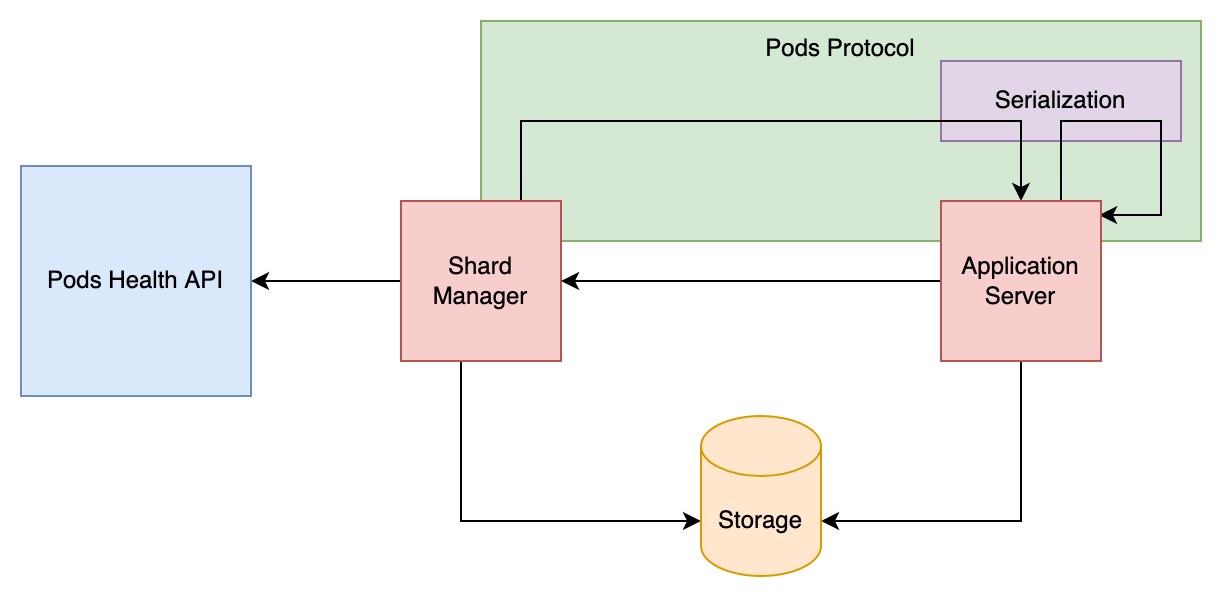
As demonstrated in the Getting Started, there are several parts of the system that are entirely customizable. For each of them, Shard provides at least a fake implementation for testing and a prod-ready implementation using common technologies.
Feel free to implement your own!
Storage
The Storage trait defines how to store and access pods and shards assignments. It contains 5 methods: getAssignments/saveAssignments to store assignments, getPods/savePods to store pods, and assignmentsStream to receive assignment updates.
trait Storage {
  def getAssignments(role: Role): Task[Map[ShardId, Option[PodAddress]]]
  def saveAssignments(role: Role, assignments: Map[ShardId, Option[PodAddress]]): Task[Unit]

  def assignmentsStream(role: Role): ZStream[Any, Throwable, Map[ShardId, Option[PodAddress]]]

  def getPods: Task[Map[PodAddress, Pod]]
  def savePods(pods: Map[PodAddress, Pod]): Task[Unit]
}
Assignments are stored per Role, since each role has its own independent set of shards.
For testing, you can use the Storage.memory layer that keeps data in memory.
Shard provides an implementation of Storage using Redis (or Valkey) with the Sage client, which requires JDK 21 or later. To use it, add the following dependency:
"com.github.ghostdogpr" %% "shard-storage-sage" % "3.0.0-RC1"You can then simply use the StorageRedis.live layer.
It requires a RedisConfig with the following options:
assignmentsKey: a function returning the key to store the shard assignments of a role in Redis (shard_assignments:<role>by default)podsKey: the key to store registered pods in Redis (podsby default)
It also requires a SageClient. Here's an example how to build it:
import sage.{ Endpoint, SageConfig, SageException, Topology }
import sage.backend.SageClient
import zio.ZLayer

val redis: ZLayer[Any, SageException, SageClient] =
  SageClient.layer(SageConfig(topology = Topology.Standalone(Endpoint("localhost", 6379))))
See the Sage configuration for clusters, TLS and authentication.
Alternatives
Two other Redis implementations are available. They store data in the same format, so you can switch between them. They provide the same StorageRedis.live layer and RedisConfig, but require a different client:
shard-storage-redisuses redis4cats and requires aRedisobject, an alias toRedisCommands[Task, String, String] & PubSubCommands[Task, fs2Stream, String, String].shard-storage-redissonuses Redisson and requires aRedissonClient.
Messaging Protocol
The Pods trait defines how to communicate with remote pods. It is used both by the Shard Manager for assigning and unassigning shards, and by pods for internal communication (forward messages to each other).
trait Pods {
  def assignShards(pod: PodAddress, shards: Set[ShardId]): Task[Unit]
  def unassignShards(pod: PodAddress, shards: Set[ShardId]): Task[Unit]
  def ping(pod: PodAddress): Task[Unit]

  def sendMessage(pod: PodAddress, message: BinaryMessage): Task[BinaryReply]
  def sendStream(pod: PodAddress, messages: ZStream[Any, Nothing, BinaryMessage]): Task[BinaryReply]
  def sendStreamAndReceiveStream(
    pod: PodAddress,
    messages: ZStream[Any, Nothing, BinaryMessage]
  ): ZStream[Any, Throwable, BinaryReply]
}
For testing, you can use the Pods.noop layer that does nothing.
Shard provides an implementation of Pods using the gRPC protocol. To use it, add the following dependency:
"com.github.ghostdogpr" %% "shard-protocol-grpc" % "3.0.0-RC1"You can then simply use the GrpcPods.live layer.
On pods, you also need expose the gRPC API. This is done by adding the GrpcShardingService.live layer to your environment. You don't need this one on the Shard Manager.
Message Codec
The MessageCodec[Msg] type class defines how a specific message type is encoded for transport between pods and how its replies and errors are encoded and decoded.
trait MessageCodec[Msg[_, _]] {
  def encodeMessage[E, A](message: Msg[E, A]): Array[Byte]
  def decodeMessage(bytes: Array[Byte]): Msg[Any, Any]
  def replyCodec[E, A](message: Msg[E, A]): ReplyCodec
}
RecipientType[Msg] (the parent of EntityType[Msg] and TopicType[Msg]) requires a given MessageCodec[Msg] at the declaration site.
The expected pattern is to import a backend's package-level given right where the type is declared:
import shard.kryo.given

object Guild extends EntityType[GuildMessage]("guild")
Different entity / topic types can use different backends side by side — just import the right given in each declaration site.
Java serialization (tests only)
Bundled with shard-entities, intended for tests and examples. Not recommended for production.
import shard.javaSerialization.given

object Guild extends EntityType[GuildMessage]("guild")
Kryo
Uses the Kryo binary serialization library via altoo's scala-kryo-serialization. Reflective — no derivation, no compile-time constraints on the message type. The given covers every type uniformly.
"com.github.ghostdogpr" %% "shard-serialization-kryo" % "3.0.0-RC1"import shard.EntityType
import shard.kryo.given
object Guild extends EntityType[GuildMessage]("guild")For a custom Kryo configuration (extra registered serializers, references off, etc.), define your own given instead of importing shard.kryo.given.
import shard.EntityType
import shard.kryo.KryoMessageCodec
import shard.interfaces.MessageCodec
import com.typesafe.config.ConfigFactory

given [Msg[_, _]]: MessageCodec[Msg] = KryoMessageCodec.fromConfig[Msg](ConfigFactory.load("my-kryo.conf"))

object Guild extends EntityType[GuildMessage]("guild")
Proteus
Uses Proteus (macro-derived, protobuf-compatible wire format). The codec is derived per message type at compile time. Message types must be a sealed trait or an enum, whose variants extend it with fixed type arguments. Reply and error types must be a case class, sealed trait, enum, Unit, Nothing or have a ProtobufCodec in scope: other types (Int, Set[String], …) need to be wrapped in a case class.
"com.github.ghostdogpr" %% "shard-serialization-proteus" % "3.0.0-RC1"import shard.proteus.given
object Guild extends EntityType[GuildMessage]("guild")The Proteus given will pick up any in-scope ProtobufCodec[T] you've declared (e.g. via derives proteus.ProtobufCodec on your types) before falling back to deriving one — useful if you want to register custom field codecs.
To get a .proto file describing a message type, use ProteusMessageCodec.dependency. It includes the message and all its reply, error and stream types.
import shard.proteus.ProteusMessageCodec

val proto: String = ProteusMessageCodec.dependency[GuildMessage]("guild", "com.example.guild").render(Nil)
Call it where the same ProtobufCodec instances as your EntityType are in scope, so that the .proto matches the wire format.
Proteus also offers protobuf's forward/backward compatibility rules, which makes it a good choice when you need to do rolling updates that change the message format.
Server updates and message versioning
- Messages are not persisted, which means that if you stop and restart the whole system, you can change anything in the message format.
- On the other hand, if you wish to do rolling updates (update servers progressively without downtime), you need to be careful with changes in the message format.
- What you can do largely depends on the backend you choose. Kryo is reflective and pretty strict by default — most changes will break the wire format. Proteus uses protobuf's evolution rules, so adding optional fields or new variants is safe.
- When you can't modify an existing message, the usual fallback is to introduce a new message type that won't be used until the rolling update is finished (so old nodes never receive new messages).
Health
The PodsHealth trait defines how to know if a pod is still alive or is dead (in which case, we should reassign all its shards).
trait PodsHealth {
  def isAlive(pod: Pod): UIO[Boolean]
}
For testing, you can use the PodsHealth.noop layer that always returns true, or the PodsHealth.local layer that uses ping from the Messaging Protocol to check if a pod is alive.
Shard provides an implementation of PodsHealth using the Kubernetes API. To use it, add the following dependency:
"com.github.ghostdogpr" %% "shard-health-k8s" % "3.0.0-RC1"You can then simply use the K8sPodsHealth.live layer. This is requiring a Pods layer that comes from zio-k8s, and a K8sConfig with the following options (K8sConfig.default caches 500 pod statuses for 3 seconds and looks in all namespaces):
cacheSize: how many pod statuses to keep in cachecacheDuration: how long to keep a pod status in cachenamespace: a function returning the namespace to look for the pods of a role in (all namespaces ifNone)labelSelector: a function returning a label selector to filter the pods of a role (no filter ifNone)
Examples
Check the examples folder that contains a full example using Redis, gRPC and the Kryo message codec.