
Getting Started
Shard is a Scala open source library that makes it easy to distribute entities across multiple servers and interact with those entities using their ID without knowing their actual location (this is also known as location transparency).
Shard exposes a purely functional API and depends heavily on ZIO. It is recommended to be familiar with ZIO to read this documentation.
A simple use case
We are building a multiplayer game where users can join guilds. We expect our game to be successful, so we need to be able to scale out (deploy it on multiple servers to handle the load).
A guild is limited to 30 members. Let's consider the case where 2 users try to join a guild at the exact same time, but our guild already had 29 members.
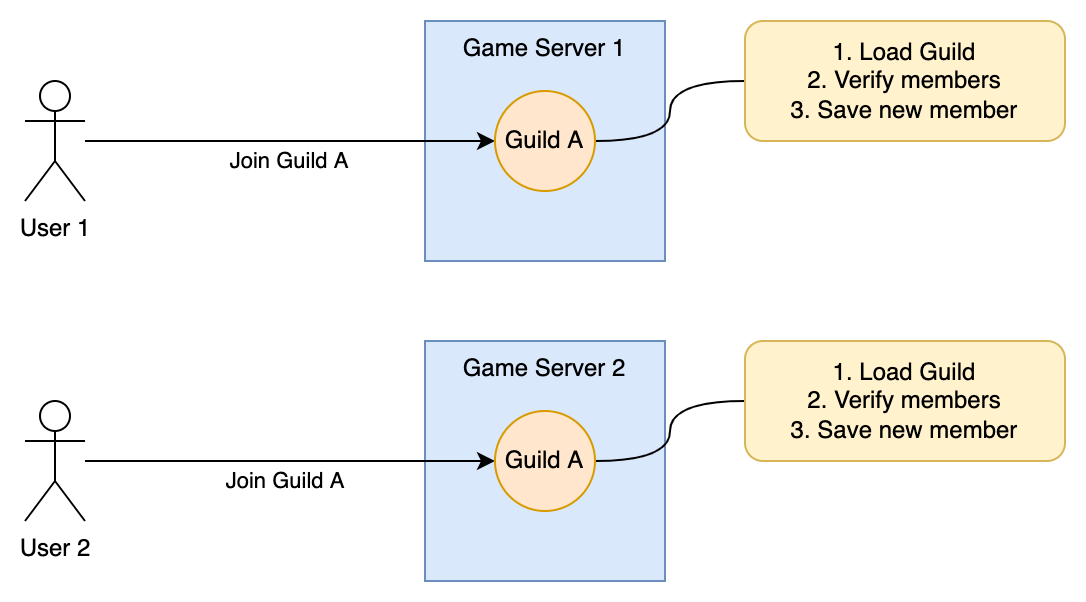
If we implement this naively, 2 different servers might receive our 2 requests to join the guild. They will both check the current size of the guild at the same time, which will be 29 and they will both accept the new guild member. Now our guild has 31 members 😱.
There are 2 common approaches to deal with this issue:
- Global lock approach: when checking the members of the guild, acquire a lock that is shared between the different game servers, and release it after saving the new member. That way, if 2 different game servers try to do it at the same time, the 2nd one will wait for the first one to finish.
- Single writer approach: instead of handling the requests on 2 game servers concurrently, redirect the 2 requests to a single entity that will handle them sequentially.
Entity Sharding is a way to implement the second approach. In this case our entities (here, our guilds) will be spread across our game servers so that each entity exists in only one place at the time.
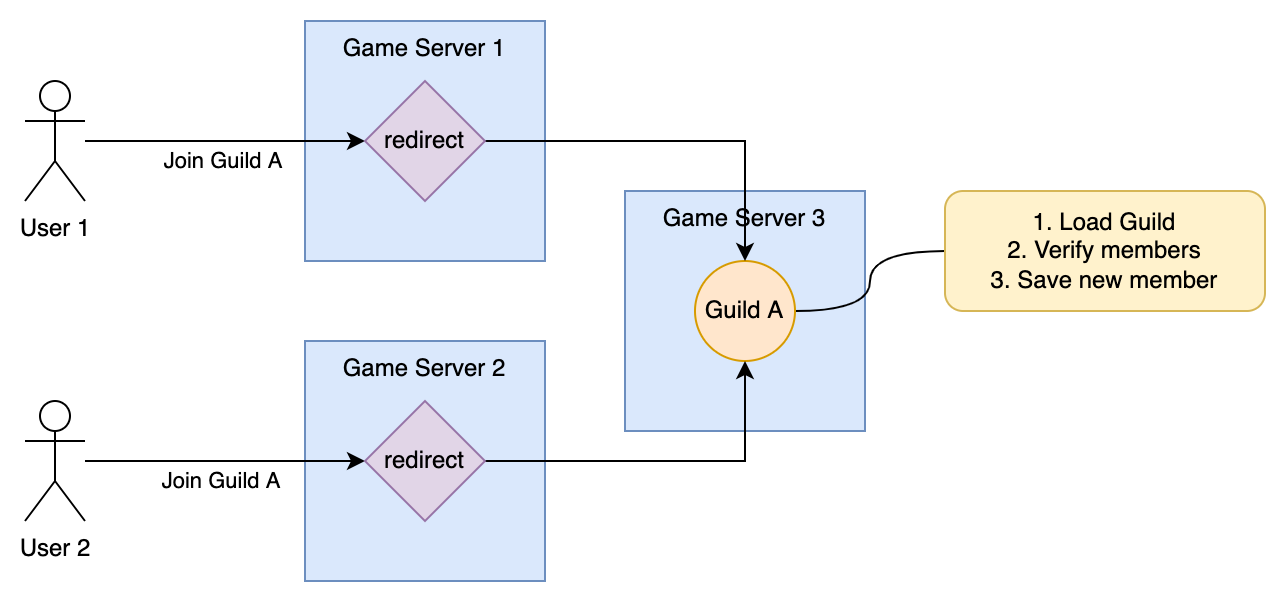
If our entity might be on any game server, how do we know where it is? This is the second characteristic of entity sharding, known as location transparency: we only need to know the entity ID. Using the entity ID, the sharding system will be able to find on which server the entity is located.
Shard provides components to:
- automatically manage the assignments of entities to game servers
- send messages to your entities using their IDs
Once sharding is setup, it will let you write code like the following (sending a message to guild regardless of its location):
def joinGuild(guildId: GuildId): ZIO[Context, GuildFull | ClusterError, GuildState] =
  for {
    userId     <- getCurrentUserFromContext
    guildState <- guild.send(guildId)(JoinGuild(userId))
  } yield guildState
Terminology
Before we go further, let's define a few terms:
- An entity is a small message handler that can be addressed by ID. For example,
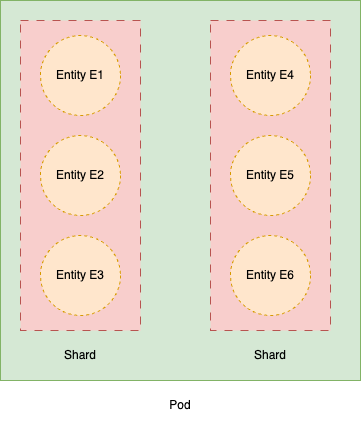
User AorGuild Bare entities. In this case we say thatUserandGuildare entity types. - A pod is an application server that can host entities. Entities usually run on multiple pods, but a single entity will only run on a single pod at the time. You will never have the same entity running on 2 different pods.
- A shard is a logical group of entities that will always be located on the same pod. There might be millions of entities, so instead of keeping millions of entities-to-pods mappings, we group entities into shards and maintain reasonably-sized shards-to-pods mappings.
Key components
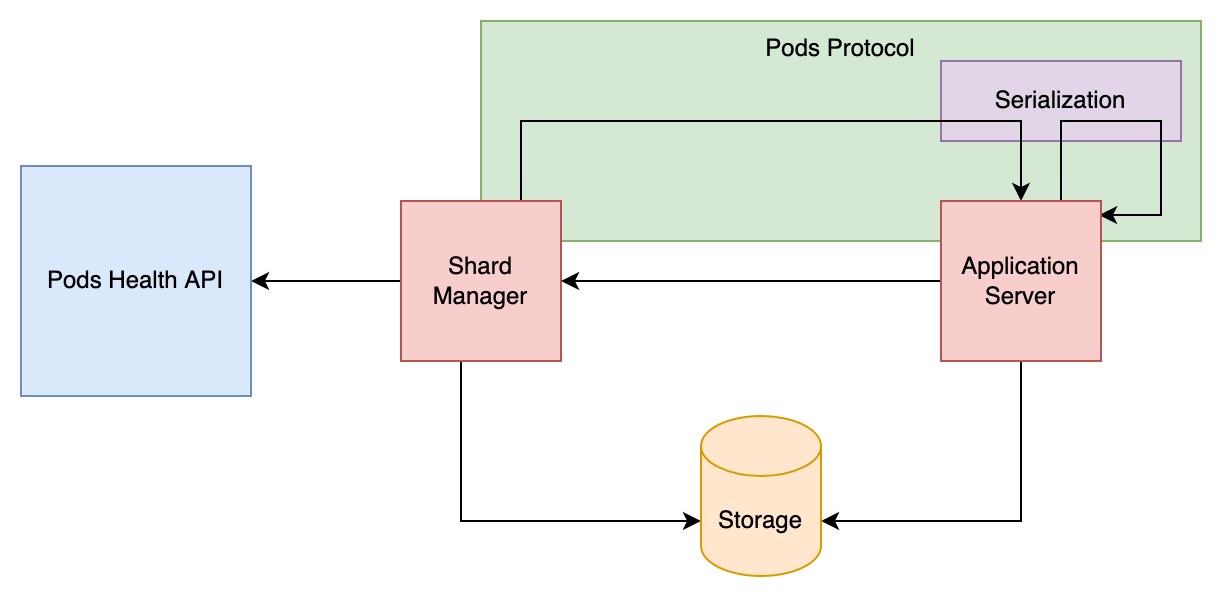
Shard is composed of 2 main components:
- The Shard Manager is an independent component that needs a single instance running. It is in charge of assigning shards to pods.
- Entities will run on your application servers and process messages that are sent to them. Note that the entity behavior (including entity persistence) is entirely up to you. Shard only takes care of starting entities on the right pods as well as the communication between them.
There are 4 pluggable parts that can be implemented with the technology of your choice.
- The
Storagetrait defines where shard assignments will be stored. Shard provides an implementation using Redis. - The
Podstrait defines how to communicate with remote pods. Shard provides an implementation using gRPC as the protocol. - The
MessageCodec[Msg]type class defines how to encode and decode messages of a given type. Shard provides backends using Kryo (reflective, no derivation) and Proteus (macro-derived, protobuf wire format). - The
PodsHealthtrait defines how to check if a pod is healthy or not. Shard provides an implementation using the k8s API.
An example
Shard Manager
The first thing we need to do is starting the Shard Manager. This component is available by importing the shard-manager dependency, and requires implementations of Storage, Pods and PodsHealth to work.
To make it simpler and run our example without 3rd parties, we're going to run a simple PodsHealth implementation that just pings a pod to see if it's alive, and in-memory Storage. We need a proper messaging protocol to communicate with pods, so we're going to use shard-protocol-grpc.
"com.github.ghostdogpr" %% "shard-manager"       % "3.0.0-RC1"
"com.github.ghostdogpr" %% "shard-protocol-grpc" % "3.0.0-RC1"
The Shard Manager exposes a small gRPC API, which means we need to start a small server. This can be done by calling Server.run and providing all the required dependencies.
import shard._
import shard.interfaces._
import zio._

object ShardManagerApp extends ZIOAppDefault {
  def run: Task[Nothing] =
    Server.run.provide(
      ZLayer.succeed(ManagerConfig.default),
      ZLayer.succeed(GrpcConfig.default),
      PodsHealth.local, // just ping a pod to see if it's alive
      GrpcPods.live,    // use gRPC protocol
      Storage.memory,   // store data in memory
      ShardManager.live // shard manager logic
    )
}
That's it! Running this small app will start the Shard Manager and its API. It is now ready to receive registration from pods.
Entity Behavior
We now need to define our entity behavior: what kind of messages can our entity receive, and what to do when it receives those messages. We will model our Guild example.
First, we need the following dependencies:
"com.github.ghostdogpr" %% "shard-entities"           % "3.0.0-RC1"
"com.github.ghostdogpr" %% "shard-protocol-grpc"      % "3.0.0-RC1"
"com.github.ghostdogpr" %% "shard-serialization-kryo" % "3.0.0-RC1"
Let's start with defining the messages our entities can receive. We will have 2: one for joining a guild and one for leaving. We create an enum (or a sealed trait) with two type parameters: for each message, E is the type of the errors it can fail with and A is the type of its reply. Use Nothing for E when a message can't fail, and Unit for A when there is nothing to reply.
case class GuildFull(maxMembers: Int)

enum GuildMessage[E, A] {
  case Join(userId: String)  extends GuildMessage[GuildFull, Set[String]]
  case Leave(userId: String) extends GuildMessage[Nothing, Unit]
}
We also need to define an Entity Type. This is done by extending EntityType with the message type as well as a unique String identifier for this type. The EntityType constructor requires a given MessageCodec[GuildMessage] in scope, which decides how messages are serialized on the wire. Here we pull in the Kryo backend's universal given by importing it next to the declaration:
import shard.kryo.given

object Guild extends EntityType[GuildMessage]("guild")
See the Customization section for the other available backends.
The behavior itself is a function with the following signature:
def behavior(entityId: String): ZIO[Scope, Nothing, Guild.Handler]It is called when an entity starts, and returns the handler that processes its messages, one at a time. The handler's handle method takes a message and returns its reply, and the compiler checks that each reply has the type declared by its message.
We will use a Ref[Set[String]] to hold our state (the list of users in the guild). When we receive a Join request, we check if the guild is already full (here, we hardcode the max to 5) and respond with a failure or modify the state and respond with a success.
def behavior(entityId: String): ZIO[Scope, Nothing, Guild.Handler] =
  Ref.make(Set.empty[String]).map { state =>
    new Guild.Handler {
      def handle[E, A](message: GuildMessage[E, A]): IO[E, A] =
        message match {
          case GuildMessage.Join(userId)  =>
            state.get.flatMap(members =>
              if (members.size >= 5) ZIO.fail(GuildFull(5))
              else state.updateAndGet(_ + userId)
            )
          case GuildMessage.Leave(userId) =>
            state.update(_ - userId)
        }
    }
  }
The Scope is closed when the entity stops (either by a rebalance or because of inactivity): use it to acquire resources or to save the entity state with ZIO.addFinalizer.
Run the application
To run our entities, we need to register their behavior to the Sharding system, which is done by calling Sharding.registerEntity, passing the entity type and the behavior.
We then need to notify the Shard Manager that a new pod is now ready to run entities, and shards may be assigned to it. This is done by calling Sharding.registerScoped (which is the equivalent of calling Sharding.register when the program starts and Sharding.unregister when the program ends).
To communicate with our entities, we need a Messenger[GuildMessage], which we get by calling Sharding.messenger. You can even use messenger on a pod that is not hosting any entities.
  val program =
    for {
      _     <- Sharding.registerEntity(Guild)(behavior)
      _     <- Sharding.registerScoped
      guild <- Sharding.messenger(Guild)
      _     <- guild.send("guild1")(Join("user1")).either.debug
      _     <- guild.send("guild1")(Join("user2")).either.debug
      _     <- guild.send("guild1")(Join("user3")).either.debug
      _     <- guild.send("guild1")(Join("user4")).either.debug
      _     <- guild.send("guild1")(Join("user5")).either.debug
      _     <- guild.send("guild1")(Join("user6")).either.debug
    } yield ()
send("guild1")(Join(...)) returns an IO[GuildFull | ClusterError, Set[String]], where ClusterError covers the errors of the cluster itself (see Errors).
Finally, we provide all required dependencies as we did for the Shard Manager.
def run: Task[Unit] =
  ZIO.scoped(program).provide(
    ZLayer.succeed(Config.default),
    ZLayer.succeed(GrpcConfig.default),
    Storage.memory,           // store data in memory
    ShardManagerClient.live,  // client to communicate with the Shard Manager
    GrpcPods.live,            // use gRPC protocol
    GrpcShardingService.live, // expose gRPC service
    Sharding.live             // sharding logic
  )
We can now run our program. It will successively send 6 Join messages to our guild and print the result:
Right(Set(user1))
Right(Set(user1, user2))
Right(Set(user1, user2, user3))
Right(Set(user1, user2, user3, user4))
Right(HashSet(user1, user5, user4, user2, user3))
Left(GuildFull(5))
Going further
A messenger can also send a message without waiting for its reply (sendDiscard), send a message whose reply is a stream (stream), or send a stream of messages (sendStream). See the Entities and Messaging section for these, as well as entity options, errors and delivery guarantees.
One more thing...
Sharding also exposes 2 methods that can be interesting for some use cases:
registerSingletonlets you register some background processes that will run in only one pod at any given time. Singletons can't receive messages and they are not stopped in case of inactivity.registerTopiclets you broadcast messages to all registered pods (useSharding.broadcasterinstead ofSharding.messenger).
Where to go from there?
In this simple example, we only had a single pod so there was no real benefit from using sharding. But we could run the exact same code on multiple pods, and the sharding system would ensure that each guild is only running on a single pod. In other words, all messages sent to guild1 would be handled by the same pod.
The only changes we would need to make would be:
- to use an actual
Storageimplementation for sharding (e.g. Redis) - to save our guild state somewhere instead of in memory, so that we don't lose this state if the guild entity is moved from one pod to another
The running code for this example can be found here, as well as a more complex example using Redis to persist data and where you can run multiple pods.
To understand how Sharding works under the hood, have a look at the Architecture section. The Configuration section explains how to configure the sharding system. Finally, the Customization section describes how you can use your own storage, message codec or messaging protocol, as well as the options provided by Shard.
Differences with Akka Cluster Sharding ?
Akka Cluster Sharding is the main alternative for sharding in Scala. Here is how Shard differs from Akka:
Shard is a purely functional library based on
ZIO, while Akka is a library leaning towards the "better Java" style of Scala and is based onFuture.With Akka, all application servers must be part of a cluster. This is particularly tricky to configure and sensitive to all kinds of failures. This is not the case with Shard since the Shard Manager is an external component that relies on systems like Kubernetes to monitor pod health.
Akka is way more than a sharding library, this is basically an entire framework that has a lot of features. Shard is much simpler and modular. It lets you customize multiple things, including the messaging protocol between pods.